Guide
3D
A physical product as a model inside the film: three.js drawn by seek(t), Blender run headless to make a model ready and to render hero shots, what each costs and where it runs.
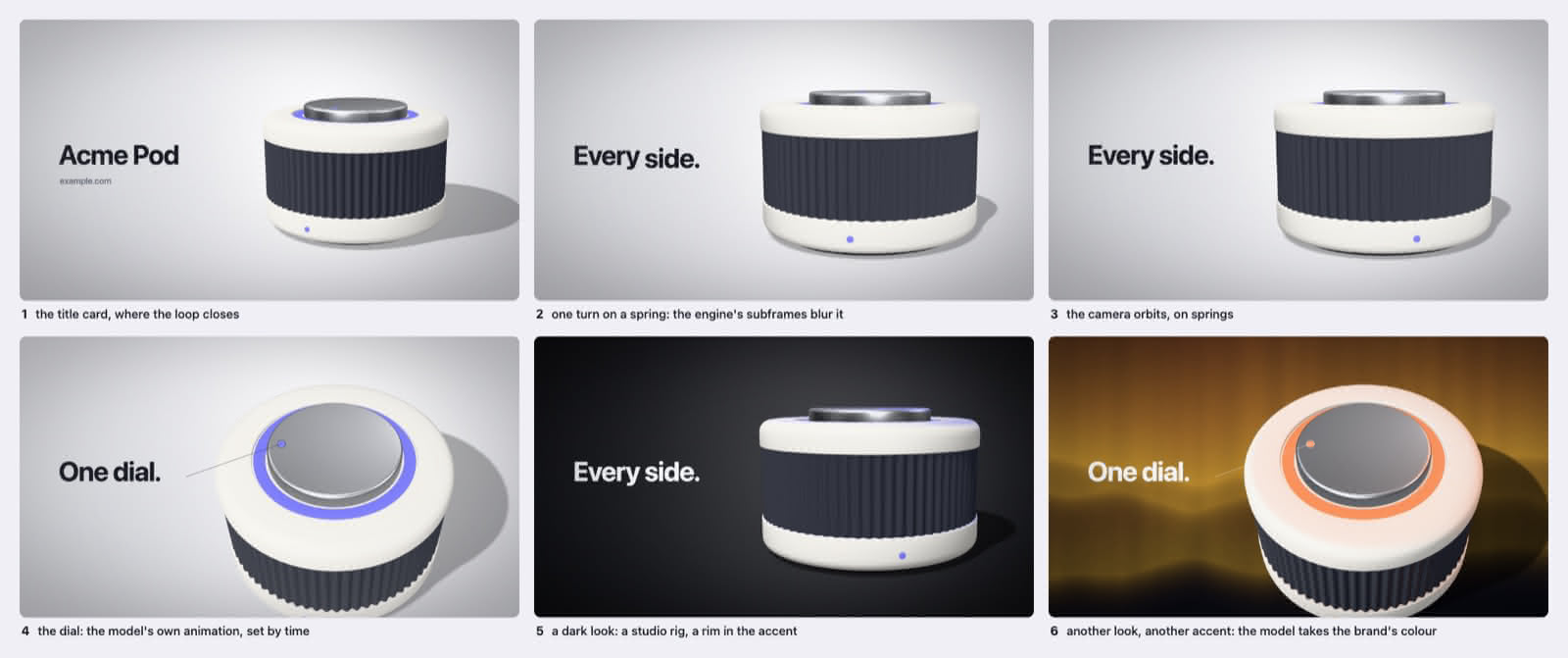
A film can show an object in three dimensions, two ways. The default is the product’s own model drawn by three.js inside the page’s seek(t), between the look’s backdrop and the headlines (space.js; space.html is its template). The other is a hero shot rendered by Blender and drawn by t like a picture, for what three.js does not draw. space.html, on the kit’s sample model:
When to use it
- For a physical product or a hero object: hardware, packaging, a thing people hold. It is the Product in 3D format.
- Never in place of the real UI. A product’s screens are still rebuilt as vector, and a product that is software and nothing else gets no 3D shot because one is possible: Devices in 3D stays the format for its surfaces.
- The model is the product’s own, asked for like any other asset: its CAD export, its
.blend, a GLB of yours or from the product’s repository. Never one from a model library standing in for the product, never a generated one. The Acme Pod in the kit is a sample for the templates and the tests, and is in no product’s film.
Making a model ready
B=<skill>/scripts/blender.mjs
node $B where                                   # is Blender there, and which
node $B prepare model.fbx src/models/acme.glb   # or .blend .obj .stl .ply .usd .gltf
node $B embed src/models/acme.glb               # an uncompressed GLB: no Blender
From the film’s work folder (By hand says where the skill’s folder is). prepare runs Blender headless and writes a plain GLB: transforms applied, centred, stood on the ground, its longest side 1, decimated towards 60,000 triangles in all (--tris; a target, not a guarantee: a mesh with shape keys, or one under 64 triangles, is left as it is), textures at most 2048 px (--texture), every material as glTF’s PBR; a model that moves keeps its animation. It prints the triangles before and after (read the count it ends with), the materials’ names, the animations and their lengths, and a note for each thing glTF could not carry (a procedural texture, a shader that was not a Principled BSDF). Beside the GLB it writes the same file as a script, acme.glb.js: a page opened from disk can fetch nothing, so the page loads its model with a script tag.
A GLB that is ready needs no Blender: embed writes its script alone. Ready means uncompressed: the kit carries no Draco or meshopt decoder, so the page refuses a GLB compressed with either, and such a model goes through prepare, like any other format.
Only a film with 3D gets the 3D files in its src/: three/ (three.js 0.187 as one script, 647 KB, with its MIT licence), space.js and the model’s script. Nothing is downloaded for them.
In the page
space.js is the engine’s 3D layer. A page makes a shot, loads its model before frame 0, and then sets from t, on every frame, everything that moves, and draws once:
const SHOT = SPACE.shot({ W, H, rig: 'auto', tone: LOOK.tone, accent: C.accent });
const pod = await SHOT.load('models/acme.glb');    // before frame 0
const CAM = SPACE.orbit([[0.8, -16, 9, 2.45, 0.6, 0.95]],
                        { yaw: 28, pitch: 14, dist: 2.9 });
// in seek(t): everything that moves, from t; then one draw
pod.turn(360 * FILM.spr(t, 0.8, 0.5, 1));
pod.pose('Dial', t - 4.6);                         // its own animation, at a time
SHOT.draw(ctx, CAM(t), { shift: [330, 20] });| Call | What it does |
|---|---|
SPACE.shot, SHOT.load | A scene with its light rig, and a GLB loaded into it. The page is ready only once the model is. |
SPACE.orbit | The camera on the engine’s springs: yaw and pitch in degrees, the distance in the model’s longest sides. |
model.turn, model.pose | A turn in degrees, and the glTF’s own animation at a time: no clock runs it. |
model.tint, model.part | A material in the brand’s colour, by the name prepare printed; a node of the model, to move by hand. |
SHOT.draw | The shot onto the frame; shift moves the picture in pixels without changing its perspective: the model beside a headline. |
SHOT.project, SHOT.box | Where a point of the model, or the whole model, lands on the frame: a callout’s line, a cursor’s target, the box the checks read. |
SPACE.sequence | A hero shot rendered by Blender, drawn by t (below). |
- Set everything from
t. three.js keeps a scene between frames, so a thing set on one frame and not on the next is carried over: the one way a 3D shot stops being a function of time.render.mjs seekcheckcatches it. - The light follows the look:
rig: 'auto'isdaylighton a light tone (a soft room, a key from the upper left, a light shadow on the ground) andstudioon a dark one (a dim room, a hard key, a rim in the accent from behind);softis nearly shadowless. The ground is invisible and shows only the shadow, so the look’s backdrop stays the backdrop. - It is a film like the rest. Each subframe is one draw at its own moment, so a turning model blurs as a moving card does, and the subframe’s jitter goes into the 3D camera, so edges in a slow orbit do not shimmer. A look, a transition and
ALPHA=1take the layer as they take any other, and every shot of a page shares one WebGL context. - The checks see it as they see a window: the model’s box is the product’s size and a mark no headline may cross, its turn and its camera moves are planned moves, a title card a planned hold.
space.htmlpasseslayoutcheck.mjs,motioncheck.mjs,seekcheckandloopcheck(Checks).
A hero shot from Blender
For what space.js does not draw: glass and refraction, light that bounces, a simulation, a depth of field. Blender renders the shot as PNGs with alpha, at the film’s frame rate, shutter and size, with a sequence.js beside them:
# a frame or two first
node $B render scene.blend src/hero --frames 1-2 --size 640x360 --samples 24
# then the shot, at the film's frame rate, shutter and size
node $B render scene.blend src/hero --seconds 2 \
  --fps 60 --shutter 360 --size 1920x1080
It writes src/hero/0001.png and on, and sequence.js beside them. The page takes three lines, and render prints them when it ends: the script tag first (SPACE.sequence stops without it), the sequence loaded in window.ready, and the draw in seek(t, opts), like a picture.
<script src="hero/sequence.js"></script>
const HERO = await SPACE.sequence('hero');                   // in window.ready
HERO.draw(ctx, (opts.frame ?? t) - t0, { x, y, w, h });      // in seek(t, opts)
opts.frame is the moment of the frame a subframe belongs to, which picks the picture: a shutter that opens before the frame would otherwise blend two pictures, each blurred already. t still places and fades it, and t0 is when the shot starts in the film.
- A model gets a stage of its own (a camera, a studio light, a ground that only catches the shadow, a turntable); a
.blendis rendered through its own camera, lights and animation. - Its motion blur is Blender’s own, set to the film’s shutter: a frame of the sequence is a picture, and the engine can blur how the picture moves across the frame, not what moves inside it.
- Every frame is loaded before the page is ready: about 1.5 MB of memory a 1920 × 1080 frame, so keep a shot to a few seconds.
- It renders cool, like
render.mjs: a third of the cores, theutilityQoS class, the thermal governor between frames, and one render at a time, Chrome’s or Blender’s. - It writes only into its folder: a
.blend’s own File Output nodes are switched off first, and said.--resumekeeps the frames there only when the model and every setting are what they were rendered with.
What a 1920 × 1080 frame of the sample cost on an M1 Max, by engine:
| Engine | A frame | What you get |
|---|---|---|
| Cycles on the CPU, the default | 133 s (64 samples, 3 of 10 cores) | The same frame is the same file every time, on a machine with no GPU too. Two seconds at 30 fps are over two hours. |
Cycles with --gpu | 13 s, after a first frame of three minutes | Two runs differ by a few pixels (94 dB), and by more from the CPU’s (45 dB). |
--engine eevee | half a second | The same file twice, on the GPU. No shadow on the look unless the scene has a floor of its own. |
So EEVEE for a shot three.js could nearly draw, Cycles for what only a path tracer draws, and Claude says the time before a Cycles shot starts.
What it costs, and where it runs
- In a render: a subframe of
space.htmltook 46 ms on a plain look against 38 ms forpromo.html(an M1 Max), so the 3D layer is about 8 ms of it; half a second at full quality took 39 to 41 s. The same frame drawn after other frames is the same file, and half a second rendered twice is the same mp4. - In the film’s folder: three.js and the sample model are 925 KB.
- three.js runs wherever Chrome does. On a machine without a GPU Chrome draws WebGL in software, which
render.mjssays in its first line; forced on the same Mac withGL=software, a subframe took 163 ms. The pictures differ a little from a GPU’s (51 dB onspace.html), so render every part of one film on one kind of machine. CI draws a still of the 3D demo in software on Linux and on Windows. - Blender’s part has been run on macOS only. On Linux and Windows
blender.mjslooks where Blender installs itself, and has not been tried there.
Blender
Optional, and yours: Manovella never installs or downloads it. It is needed only to make a model ready (any format but an uncompressed GLB) or to render a hero shot; without it blender.mjs stops and says where to get it (blender.org, or brew install --cask blender: free, a download of about 400 MB, 1 GB installed). Blender 4.2 LTS or later; an older one is refused, by its version. Tried with 4.2.23 and 5.3.0 on macOS. When it is not where the system installs it, name it with "blender" in settings.json or MANOVELLA_BLENDER for one run: see Settings.
Where your agent has a Blender MCP server, a model can be built or adjusted in a Blender left open while you watch; the result is saved as a .blend, and prepare takes it from there. Nothing in the kit needs it.
In the Studio
Product in 3D is one of the twelve formats of the Studio’s format step. With it chosen, the previews show the kit’s sample model where the window would be, lit by the look’s tone; the film shows your product’s own model.